
How to Run a Cart Abandonment Survey
Use an appropriately timed cart abandonment survey to understand reported purchase barriers and prioritize checkout fixes.

A cart abandonment survey asks people who started shopping but did not complete an order what got in the way. It can surface reported concerns such as total cost, delivery uncertainty, payment friction, or simple comparison shopping. It cannot prove that one reason caused every abandoned cart.
Define abandonment before you ask about it
A visitor who adds an item to a cart may be comparing prices, saving a list, or planning to return later. Not every unfinished cart represents a failed checkout. Decide whether your study includes cart creation, checkout start, or a later payment step. Then ask only people whose behavior matches that definition. A poorly targeted exit popup can ask a shopper why they “abandoned” a purchase while they are still browsing.
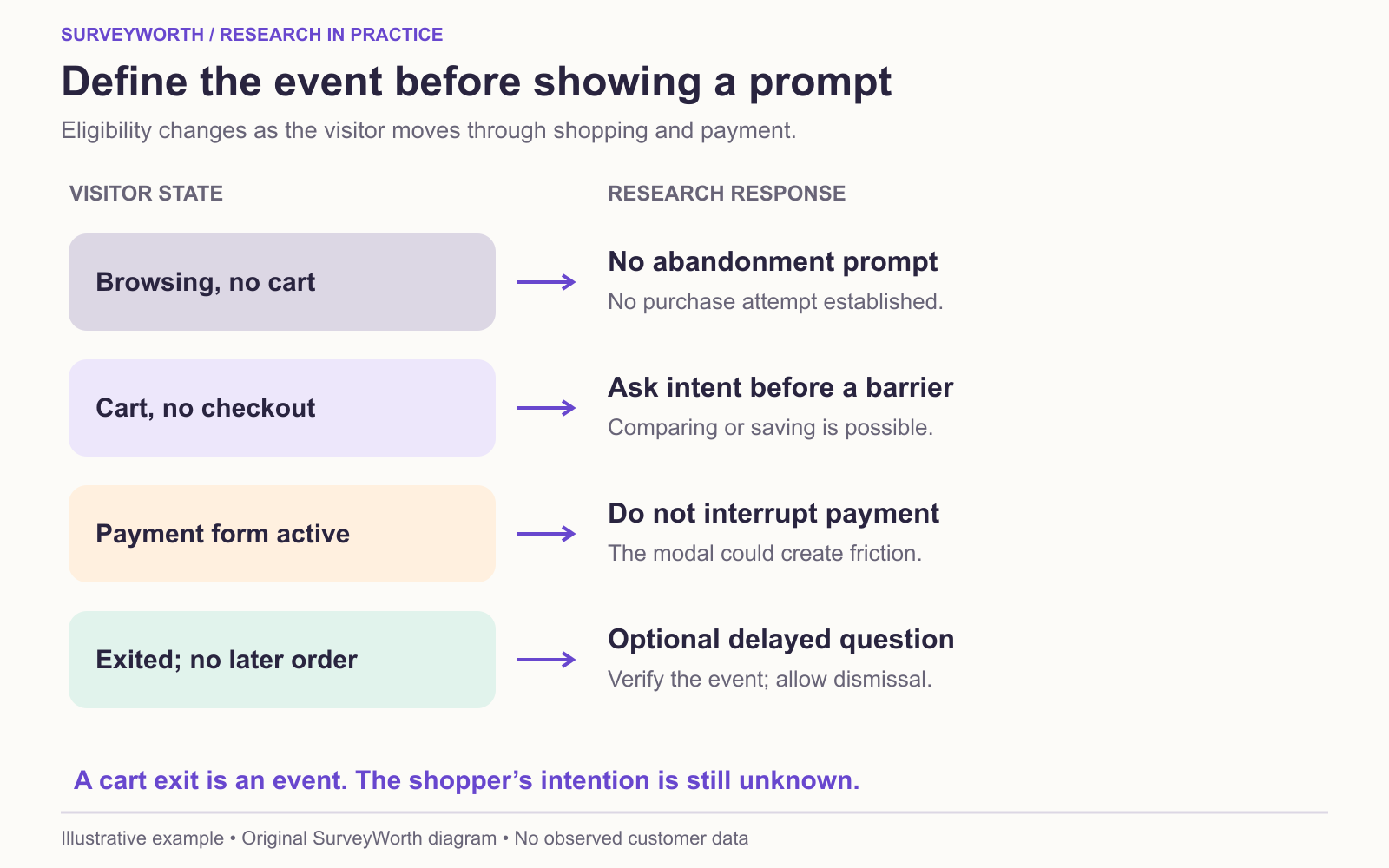
Image source: SurveyWorth original conceptual diagram, 2026. Based on “Trigger rules that do not create the behavior being measured” in this guide. Illustrative example; no observed survey data or official product screenshot.
A site intercept captures immediate reactions but may interrupt a transaction and misses people who leave without triggering it. A later message can reach identifiable users who left, but it excludes anonymous visitors and requires an appropriate contact relationship. These channels produce different samples; keep them separate in analysis unless you have a reason to combine them.
Write questions that allow ordinary reasons
A useful opening is: “Which of the following best describes what you were doing today?” Choices could include “I was ready to buy,” “I was comparing options,” “I was checking total cost,” and “I was saving items for later.” Only then ask about barriers. This prevents a survey from treating comparison shopping as a technical defect.
For people who intended to buy, ask what stopped them. Test choices such as unexpected total cost, delivery timing, payment difficulty, account creation, unavailable option, and something else. Keep categories distinct and add an optional explanation. If multiple factors contributed, allow several choices and then ask which mattered most. Avoid asking for personal payment details in the form.
Trigger rules that do not create the behavior being measured
| Visitor state | Survey action | Reason |
|---|---|---|
| Browsing a product page without a cart | No abandonment prompt. | No purchase attempt is established. |
| Cart created, checkout not started | Optional later follow-up if contact permission exists. | Leaving may mean comparison shopping or waiting. |
| Payment form still active | Do not interrupt with a modal. | The prompt itself can cause friction. |
| Checkout exited without a completed order | Consider a delayed, optional question after verifying no later purchase. | This is a plausible abandonment event, though intent remains unknown. |
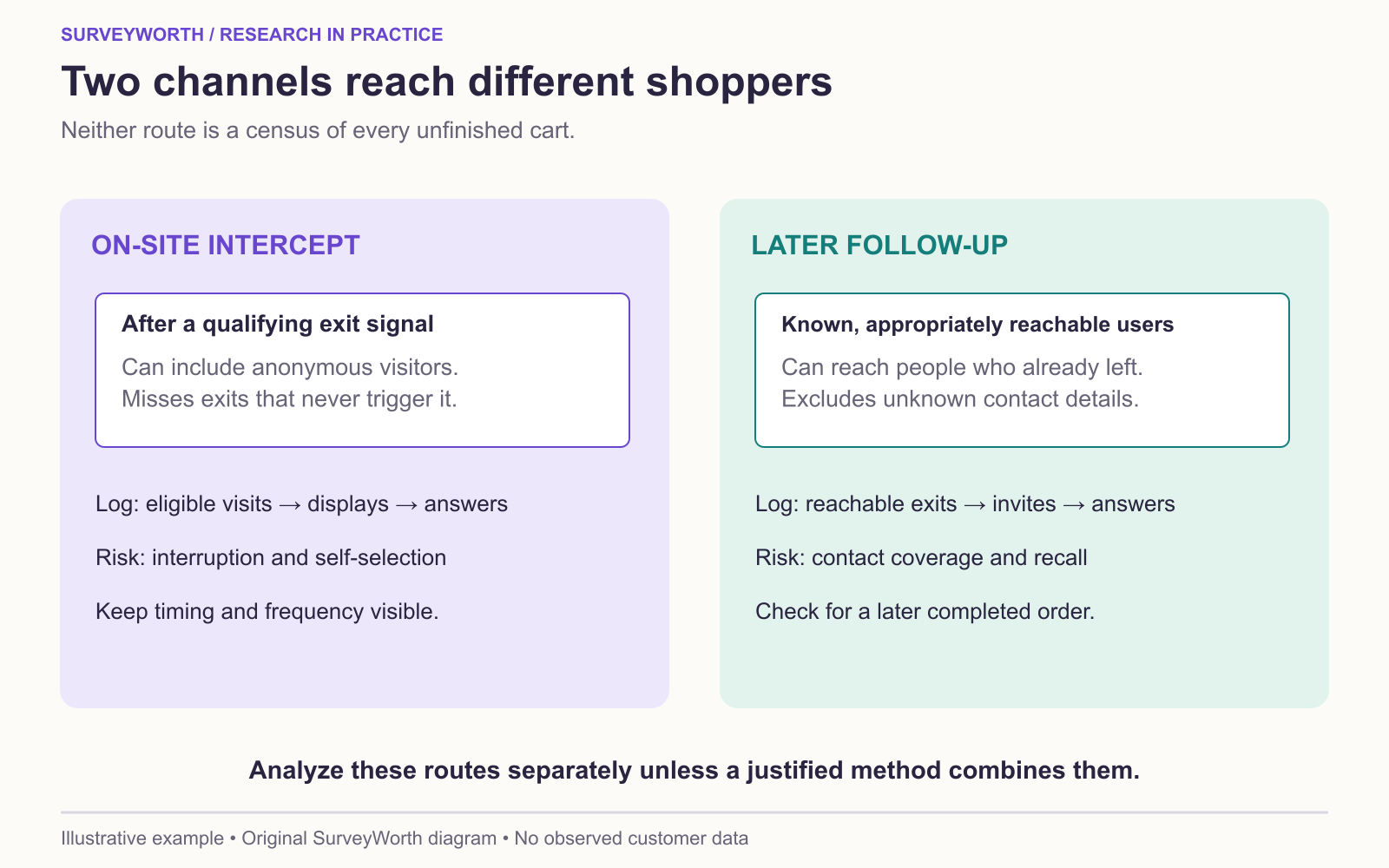
Image source: SurveyWorth original conceptual diagram, 2026. Based on “Define abandonment before you ask about it” in this guide. Illustrative example; no observed survey data or official product screenshot.
A neutral first item is: “What happened when you were considering this order?” with choices such as “I plan to return,” “I was comparing options,” “I had a problem completing checkout,” “The total cost did not work for me,” and “Something else.” Follow only relevant answers with a specific question. Count invited shoppers, eligible responses, and purchases after the invitation. Pair stated reasons with observed errors and funnel steps before declaring the main cause. A coupon embedded in the survey changes both respondent behavior and the meaning of the answer.
Diagnose the abandonment before choosing a fix
A cart exit is an event, not a reason. Hotjar’s cart-abandonment discussion suggests asking close to the experience and pairing replies with observed behavior. Build the analysis around the last step reached: product page, shipping estimate, payment, or confirmation. For a shopper who leaves before seeing shipping cost, “shipping was too expensive” cannot be attributed to the displayed checkout charge without more evidence. For a shopper who intended only to compare options, “abandoned sale” may overstate immediate purchase intent.
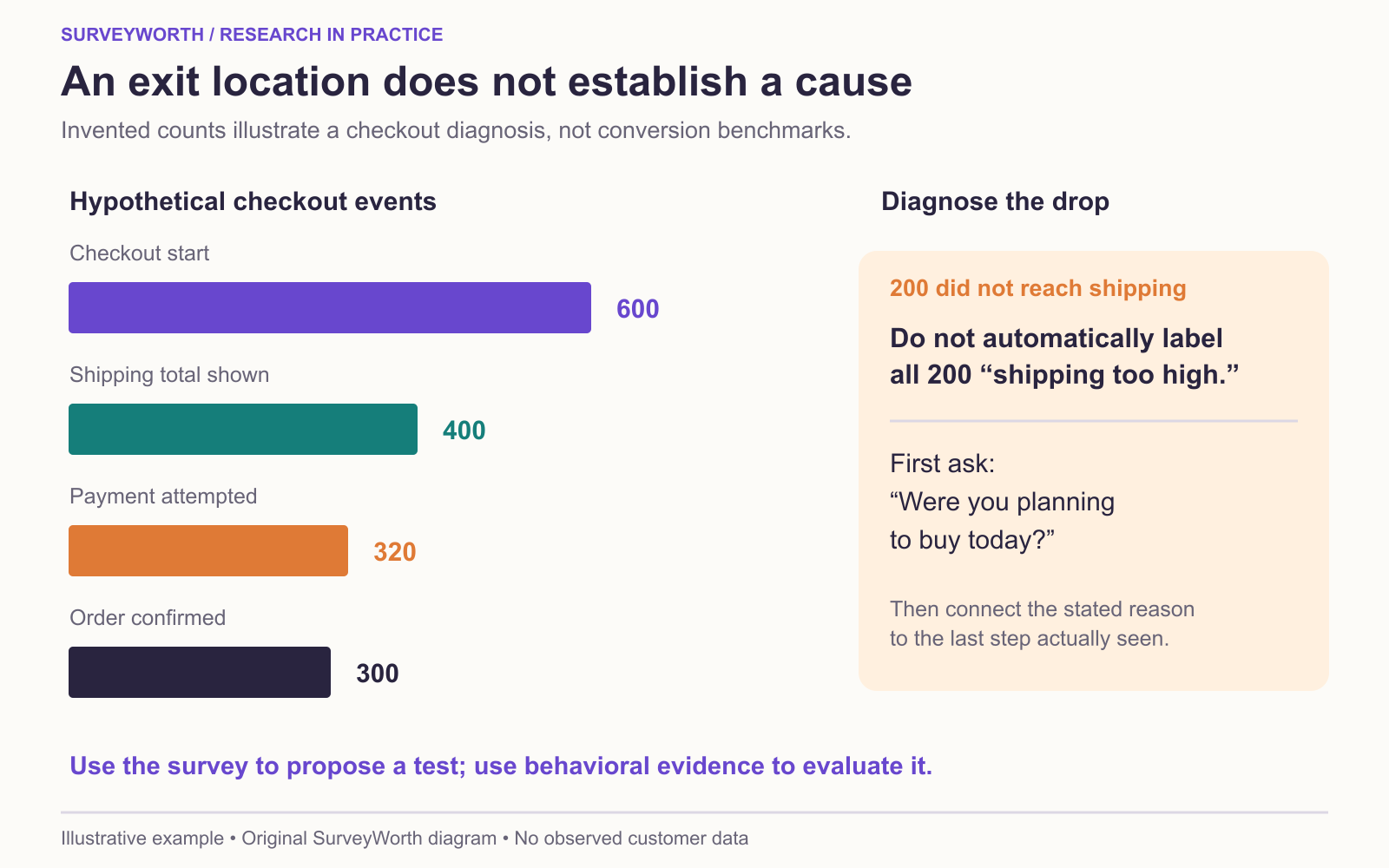
Image source: SurveyWorth original conceptual diagram, 2026. Based on “Diagnose the abandonment before choosing a fix” in this guide. Illustrative example; no observed survey data or official product screenshot.
| Observed pattern | One neutral question | Follow-up evidence | Possible next test |
|---|---|---|---|
| Exit when shipping total appears | “What, if anything, changed your plan today?” | Price display and session path. | Show the full total earlier. |
| Payment attempt fails | “Did anything prevent payment?” | Error logs and device. | Reproduce the failure. |
| Exit before checkout | “Were you planning to buy today?” | Return visits and saved carts. | Avoid an unnecessary recovery message. |
AAPOR’s survey-reporting guidance explains why the invitation route, eligibility rule, and response counts should accompany any percentage. Keep intercept responses and later email responses in separate columns because they reach different shoppers. Count eligible visitors exposed to each prompt, those who answered, and the answer base. A questionnaire can suggest what to investigate; a checkout change needs its own behavioral test. Use channel-selection guidance when deciding whether an intercept or later invitation fits the study.
Decide what the team will do with each finding
Before collecting answers, assign an owner and a confirming observation to each likely theme. A payment-error report goes to an engineer who can inspect error codes and reproduce the route. A late-shipping-cost report goes to commerce, which can test earlier total-cost disclosure. “I was comparing options” may require no recovery campaign at all; it can prompt a review of saved-cart behavior instead. This prevents the survey from becoming a list of complaints with no decision rule.
For every theme, retain the number of eligible people shown the question, the number who answered, and the number who selected the reason. If the form allows several reasons, report each as a share of valid respondents and do not expect percentages to sum to 100. If it then asks for the main reason, analyze that single-choice item separately. A shopper who returns and purchases later should remain visible in the behavior data, but the research answer should not be rewritten after the fact. The report can then say what respondents described, which checkout evidence supports or challenges it, and which change will be tested next.
Keep the intercept from changing the checkout
A prompt that appears while the customer is entering payment details can create an extra interruption. Instead, predefine the eligible exit signal, limit frequency, and provide an easy dismissal. QuestionPro’s website-intercept overview lists trigger options; Jotform’s website-usability question examples show task-focused wording. Pilot the prompt on desktop and mobile, then compare checkout completion when it is shown and when it is not, if feasible. Do not treat a higher number of survey answers as success if the prompt reduces purchases. A useful final report separates the funnel count, prompt exposure, answer base, and subsequent checkout outcome. The website-feedback workflow covers those trigger and denominator choices in more detail.
Choose tools for your next survey.
Explore survey creation software and research tools for your project.
Explore survey softwareKeep reading.

How to Test a Marketing Campaign With Surveys
Use surveys before, during, and after a campaign to test message clarity and track audience response without overclaiming causality.
Read the guide
How to Measure Brand Awareness With a Survey
Measure unaided recall and aided recognition with balanced survey questions and careful sampling.
Read the guide
How to Design a Product Testing Survey
Write product concept, prototype, and post-launch survey questions that fit what participants have actually experienced.
Read the guide